
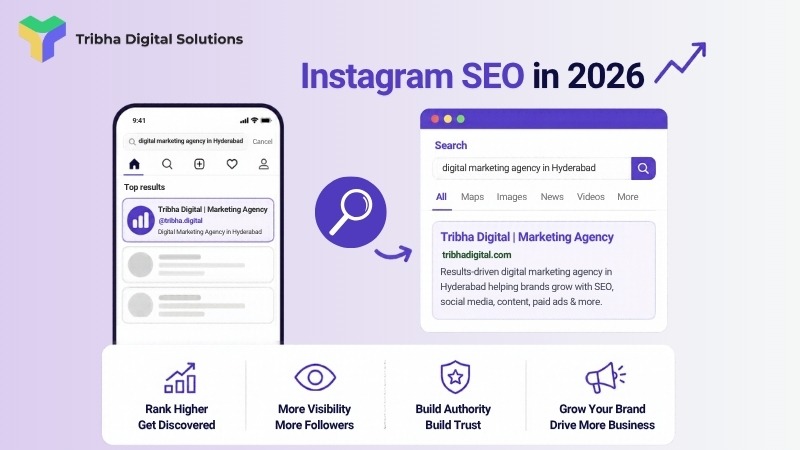
Open Instagram and type "digital marketing agency in Hyderabad" in the search bar. A few profiles and posts show up at the top. Others, maybe just as good, do not show up at all.
Why? The ones at the top made it easy for Instagram to understand what they do. That is Instagram SEO.
In 2026 this matters more than ever, because Instagram posts can now also appear on Google. This blog explains what changed and what to do about it.
What Is Instagram SEO?
Instagram SEO means writing your profile, captions, and videos so that Instagram (and Google) can clearly understand what you offer, and then show you to people who are searching for it.
You are not tricking anyone. You are using the same words your customers use.
3 Big Changes You Should Know
1. Google now shows Instagram posts.
Since July 2025, public posts from professional (business or creator) accounts can appear in Google and Bing results. This includes photos, videos, carousels, and Reels. Your caption can now work like a small web page.
2. Keywords matter more than hashtags.
Instagram's head, Adam Mosseri, has said that the words a person types in the search bar are the most important thing in deciding what shows first. Hashtags are no longer the main way to be found. You also cannot follow hashtags anymore, and Instagram has reduced the limit to 5 hashtags per post.
3. Instagram reads more than your caption.
It also looks at your name, bio, alt text, the text you put on screen in a Reel, and the words you say out loud in a video.
Step 1: Switch to a Professional Account
A professional account lets you add a business category, contact details, and location. It is also needed for Google to show your public posts. If you are still on a personal account, switch first.
Then check your settings to make sure your public posts are allowed to appear in search engines.
Step 2: Find the Words Your Customers Use
Do not guess your keywords. Use Instagram itself:
Type your service in the search bar and look at the suggestions that pop up. These are real searches.
Check what your competitors use in their names and bios.
Think about how a customer would say it, not how you would say it. A customer says "skin clinic near me," not "dermatological services."
Pick one main keyword for your business, such as "digital marketing agency." Add a few related ones for your posts.
Step 3: Fix Your Profile First
Your profile is the first thing Instagram reads.
Name field: This is searchable. Write your brand name plus your service, like "Tribha Digital | Marketing Agency." Your username can stay simple.
Bio: Say what you do, where you are, and who you help. Write it in plain words, not slogans.
Category and location: Add both. They help people nearby find you.
Link and contact button: Make it easy to take the next step.
Step 4: Write Captions That Answer a Search
A caption is not just a description. Think of it as a short answer to a question someone might type.
Weak: "New post! Check this out 🔥"
Better: "How to get more customers from Instagram in 2026: 3 simple steps for small businesses."
Put the main keyword in the first line. Then explain in a few short sentences, and end by telling people what to do next, such as "Message us to learn more."
Do not repeat the keyword again and again. The caption must read well for a real person.
Step 5: Make Your Reels Searchable
Reels are where many businesses miss out. Instagram can read:
What you say. Say your main keyword out loud early in the video. For example: "Here are three ways to get found on Instagram."
What you show on screen. Add text on screen with your keyword.
Your captions. Always turn on captions. Many people watch with the sound off, and captions also help Instagram understand the video.
Step 6: Add Alt Text to Photos
Alt text is a short description of your image. You can add it in the advanced settings before you post. Describe what is in the picture, using your keyword where it fits naturally. Example: "Owner of a Hyderabad digital marketing agency explaining Instagram tips to a client."
Step 7: Use Hashtags the New Way
Hashtags still help Instagram sort your post into a topic, but they do not bring reach by themselves. Use only a few that match your post, and make them specific. "#HyderabadDigitalMarketing" is better than "#love."
Do Not Forget Shares and Saves
Instagram also looks at how people react. Posts that people save and send to friends tend to get shown more. So make posts people want to keep: checklists, step-by-step tips, and clear answers.
Check If It Is Working
Look at your Instagram Insights every few weeks:
Are more people visiting your profile?
Are more people reaching you from people who do not follow you yet?
Which posts get the most saves and shares?
Is your profile starting to show up when you search your own keyword?
Do more of what works, and change what does not.
Mistakes to Avoid
Using a clever name that nobody would search for
Stuffing the same keyword into every line
Using many unrelated hashtags
Forgetting to turn on captions in Reels
Keeping a personal account when you are running a business
Posting a lot for one week and then stopping
Final Thoughts
Instagram has become a search engine, and Google now looks at it too. The brands that get found are not always the biggest. They are the ones that use clear words in the right places and keep posting steadily.
Start with your profile and your next five captions. Small changes add up.
Want help getting your brand found on Instagram and Google? Tribha Digital Solutions can set up your profile, plan your content, and grow your reach.
